Why This Tool Matters
Finding the cheapest place to trade crypto sounds easy, but the real cost of a trade rarely matches the price you see on an exchange screen. Fees, liquidity, and slippage all play a role, and they can quietly eat into profits or inflate losses. That’s where the Crypto Trade Analyzer comes in. Instead of showing only headline prices, it simulates how a trade would actually execute on different exchanges in real time.
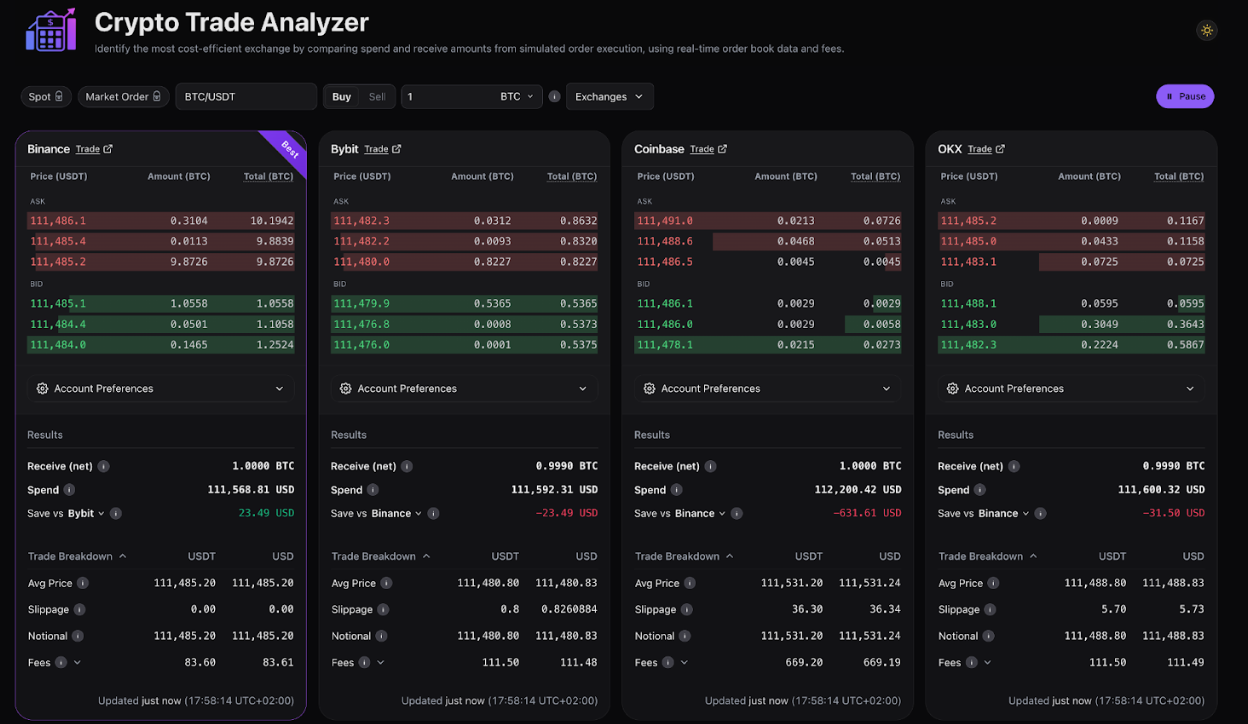
Think of it as a reality check. The tool pulls live order book data, applies fees and discounts, and shows what you’d truly pay or receive once the trade is filled. Right now, it supports major platforms such as Binance, Bybit, Coinbase, and OKX, with more integrations on the way. You can try it at binance.github.io/crypto-trade-analyzer.
Who the Analyzer Is Built For
The beauty of this tool is that it’s useful whether you're brand new to trading or managing high-volume flows:
- New traders who want to understand what affects their final price
- Frequent traders looking to cut costs on regular buys and sells
- Arbitrage traders scanning for liquidity gaps across exchanges
- High-volume traders optimizing execution quality
- Anyone comparing exchanges before opening an account
If cost matters to you, this tool helps you see what’s really happening behind the scenes.
How the Analyzer Works
The Crypto Trade Analyzer breaks every trade down into its core components. Here’s how it processes the numbers:
Live market data
It starts by pulling real-time order books from each exchange. That means the results are always based on current liquidity and pricing, not outdated snapshots.
Simulated execution
Instead of stopping at the best bid or ask, the tool simulates walking through the book level by level. This gives you a volume-weighted average price, which is far more accurate for medium or large orders.
Fees and discounts
Each exchange has its own fee model. The analyzer automatically applies maker/taker fees, volume-based tiers, and token discounts (like paying fees in BNB on Binance). You can adjust these settings to match your actual account.
Final comparison
Once calculations are done, each exchange gets a card that shows:
- Average execution price
- Slippage
- Total fees
- Net amount received or spent
- Effective price after all costs
The lowest-cost exchange gets a “BEST” label, and the tool updates in real time as markets move.
Why Price, Fees, and Slippage Matter
A quoted price is only the starting point. The effective price you end up with depends on:
- Price: What’s available in the order book right now
- Fees: Maker/taker rates, discounts, and tier levels
- Slippage: How far the actual fill drifts from the quote, especially when liquidity is thin
The analyzer brings these pieces together so you can see the true impact of your decision.
How to Use the Tool Step by Step
- Pick your trading pair and choose Buy or Sell.
- Enter your trade size in either the base asset (BTC) or quote asset (USDT).
- Select the exchanges you want to compare.
- Set your account preferences like fee tiers or token discounts.
- Review the results, which update automatically as market conditions shift.
A “Save vs” metric shows exactly how much cheaper (or more expensive) each exchange is compared to the best option.
Tips and Limitations
The tool gives a reliable picture of expected costs, but keep a few things in mind:
- Use realistic trade sizes, since huge simulated orders can distort slippage.
- Update your fee tier and discount settings regularly.
- During heavy volatility, markets can move faster than the tool updates.
- The simulation assumes taker fees and doesn’t model advanced strategies like maker orders or partial fills.
It’s a guide, not a guarantee, but it’s far more accurate than comparing listed prices.
Final Thoughts
The Crypto Trade Analyzer makes trading costs easier to understand in a world where liquidity is scattered across dozens of exchanges. It turns complex details into a clear side-by-side comparison, helping newcomers learn and experienced traders sharpen their execution.
By showing the true cost of a trade, it cuts through guesswork and helps you trade with confidence.